

AI is accelerating faster than any technology in modern history.
When ChatGPT first launched in 2022, it could only complete simple coding tasks, roughly 30 seconds of human work. Today, the best AI agents can finish two hours of human coding in a few seconds, with forecasts suggesting they’ll handle entire month-long projects by 2029, according to the Stanford 2025 AI Index Report.
Organizations are already responding: global enterprise AI investment is projected to hit $307 billion in 2025, and 78% of organizations reported using AI last year based on data from the AI Digest.
The gap between early adopters and everyone else is growing quickly. Organizations that begin using AI now are far better positioned to keep pace as capabilities compound quarter after quarter. For many nonprofits, applying for and securing grants remains one of the most resource-intensive tasks: prospecting, research, budgeting, writing, review, and follow-up. Enter AI. If used well, it promises to dramatically accelerate these tasks and free teams to focus on strategy, outreach, and mission execution.
Can nonprofits use AI for grant writing?
AI is becoming a game-changer for grant writers because it directly addresses the bottlenecks that have always made this work so time-intensive and complex. MIT research shows that using AI not only increases productivity and work quality, but also improves job satisfaction, making it an ideal support tool for a field where burnout is common. Nonprofits are already recognizing the value: in the same report by Tapp Network and TechSoup, 60% of surveyed organizations were highly interested in using AI for grant writing and fundraising last year.
Grant writing requires a blend of research, writing, strategy, compliance, and data analysis—exactly the kind of multidisciplinary workflow AI can simplify. Purpose-built AI tools can:
- Scan thousands of opportunities in minutes to identify funders aligned with your mission
- Analyze funder language and past awards to help position your proposal strategically
- Draft or refine narrative sections with improved clarity and structure
- Flag missing eligibility criteria
- Extract data from long reports
- Generate visuals to strengthen evidence
- Support communication by summarizing updates or drafting personalized messages to funders
By accelerating the repetitive steps and supporting the strategic ones, AI allows grant professionals to focus more on mission and relationship building.
Top AI grant writing use cases for nonprofits
1. Find prospective funders and understand their priorities.
Lack of alignment is continuously cited as one of the top reasons proposals are rejected. The strongest proposals start with understanding what funders actually prioritize—yet this step is one of the most time-consuming. AI can instantly synthesize information from IRS 990s, annual reports, foundation websites, RFPs, and past awards to show you whether a funder is the right fit. For example, AI might identify that the foundation consistently funds “community-led environmental programs in the Southeast with budgets under $5M.” This immediately tells you whether you’re a fit before investing hours into a proposal.
An example of how you might use grant writing AI for funder research:
- Upload a funder’s 990s, website, or RFP and ask AI to summarize their top priorities.
- Ask AI: “What themes appear in the organizations this foundation funded last year?”
- Prompt: “Analyze the tone of this funder’s website and revise our mission statement to match their communication style.”
Tools to consider for this step in the grantmaking process:
- Perplexity: Verified web research with citations
- ChatGPT (GPT-5): Tone-matching and narrative reframing
- Claude 4.1 Opus: Analyzing long documents like 990s and RFPs
2. Build a strong, fundable budget.
Understanding what type of funding you need—and how to position your budget—is just as important as choosing the right funder. Many proposals fail because budgets are unrealistic or misaligned. In fact, 24% of organizations already use AI to assist with budgeting and scenario planning.
An example of how you might use grant writing AI for budgeting:
- Run “what-if” scenarios: “If we received $100K from X funder, what outcomes could we achieve in 12 months?”
- Ask AI to stress-test your budget: “Identify red flags or inconsistencies in this proposed budget.”
- Use AI to align your cost-to-impact ratio with what funders typically support.
Tools that can help with creating a budget for your proposals:
- Google NotebookLM: Summarizes lessons from previous proposals, budgets, and reports
- Gemini + Google Sheets: Creates budget drafts and projections
- ChatGPT (GPT-5): Generates logic models and multi-scenario plans
3. Summarize long reports, evaluations, and research.
Many proposals require digesting long evaluation reports, surveys, or community needs assessments. AI can summarize 40–80 page documents into concise, funder-ready paragraphs.
This is especially valuable for federal and state grants that require evidence-based narratives.
Tools that can summarize reports and other documents:
- Claude 4.1 Opus: Best for long, dense documents
- Gemini: Excellent for fact-checking and surfacing academic sources
- Perplexity: Great for cross-referencing citations
4. Never miss a funder requirement again.
Grant writers often lose time deciphering unclear RFPs or tracking each required element. The average federal RFP is 80–120 pages long, with 200+ unique requirements. One overlooked attachment, formatting rule, or certification can disqualify even the best proposal.
Here’s how you might use AI grant writing tools to meet funders’ requirements:
- Extract every requirement, attachment, and formatting rule
- Flag missing documents
- Create a checklist with deadlines
- Identify risks or eligibility conflicts early
Tools that can help you check requirements:
- Claude: Exceptional at extracting RFP criteria
- Grammarly: Quality control for clarity and tone
- Grant Assistant: Built-in compliance workflows for funder formatting rules
5. Write grant proposals in a fraction of the time.
AI is transforming how quickly teams can move from an idea to a polished proposal. For this stage, we recommend using a purpose-built grant writing platform rather than a general AI tool.
Unlike generic AI tools, Grant Assistant is trained on the structure, tone, and logic of real grant proposals, which means it understands what funders look for and guides teams through the full process.
Grant Assistant helps teams:
- Generate funder-aligned first drafts using your organization’s data, past proposals, and the funder’s priorities.
- Rewrite and refine content for clarity, tone, and structure to ensure compelling, consistent narratives across all sections.
- Maintain a unified organizational voice, even when multiple team members collaborate.
- Organize content automatically into funder-ready formats that follow the required structure.
6. Elevate storytelling and data visualization.
Modern proposals require data, narrative, and visuals. AI helps nonprofits build all three to catch funders’ attention with a polished, visually engaging proposal.
Here’s how nonprofits use AI to streamline this step:
- Generate charts, infographics, and maps from CSV files
- Turn interviews with program participants into compelling scripts
- Convert annual reports into videos, podcasts, or one-page briefs
- Rewrite stats into persuasive impact language
AI tools that can help you bring your proposals to life with stories and data:
- Flourish: Visualize data
- Gamma: Create grant-friendly slide decks or one-pagers
- NotebookLM: Turn reports into videos or summaries
- Suno or Descript: Audio storytelling for funder updates or proposal attachments
Best Practices: Collaborate with AI, Don’t outsource to it
1. Guide how your AI “thinks.”
Every advanced AI model uses a hidden step-by-step reasoning process to reach an answer. You can make that process more accurate by telling it how to think. Here’s how that might work:
- Use prompts like “Think step by step,” “List your assumptions before answering,” or “Show your reasoning as bullet points.”
- For complex tasks, give a sequence: “First, extract eligibility criteria from this RFP. Next, build a compliance checklist. Then outline the narrative with word counts. Finally, draft each section.”
2. Be specific with your inputs.
Treat AI like a capable but uninformed assistant: it’s powerful, but it only knows what you tell it. The more specific you are, the more usable the output.
- Use precise language (e.g., “STEM after-school program for 350 low-income students in grades 6–8 in Hartford, CT” instead of just “education program”).
- Example prompt: “As a grant writer, draft a 200-word needs statement for a STEM after-school program serving 350 low-income students in Hartford, CT. Use 2023 district math proficiency data (27%) and attendance gaps. Neutral tone, APA-style citations.”
3. Get “AI-ready” with core documents.
AI works best when it has strong source material from your organization. Before you dive in, gather:
- Mission and vision statements
- Strategic plan or logic model
- Program descriptions
- Past winning grant proposals
- Approved budgets and recent financials (audit or 990)
- Evaluation or impact reports
- Org chart, staff bios, and key partner info
- Letters of support or testimonials
- Funder guidelines, RFPs, and instructions
Uploading these (into a secure, appropriate tool) lets AI draft content that actually sounds like you and stays grounded in real data.
5. Protect privacy and set internal guardrails.
You should never upload sensitive donor, client, or financial data into unsecured or public tools. Instead, you should start by investing in trusted, secure platforms. Then, create an internal AI policy covering what information your team can and cannot share. To guide your approach, download our free nonprofit AI use policy template.
6. Avoid common mistakes.
Teams get the best results when they avoid a few frequent pitfalls:
- Using vague prompts like “make this better” instead of clear instructions.
- Skipping sources, which increases the risk of AI inventing numbers or facts.
- Forgetting to set structure or word limits, leading to noncompliant responses.

Choosing the right AI tools for your nonprofit
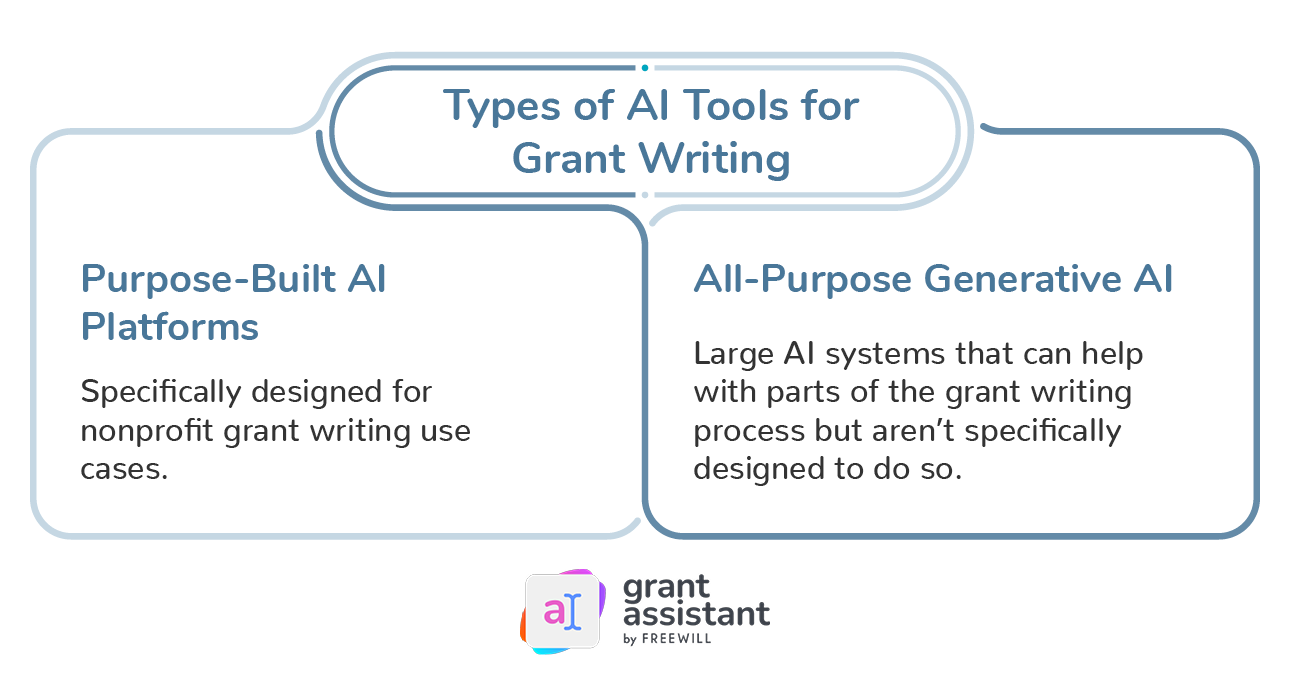
Not all AI tools are built the same—and choosing the right one can make the difference between saving hours or creating more work for your team. As nonprofits increasingly explore AI, two main categories of tools have emerged: purpose-built grant writing platforms and general-purpose AI systems. Understanding the differences will help you decide what’s best for your workflow, budget, and grant strategy.
Purpose-built platforms (recommended for grant writing)
These tools are designed specifically for nonprofit grant workflows. They understand the structure of proposals, funder expectations, compliance rules, and the narrative style of the sector. Platforms like Grant Assistant offer features you won’t find in generic systems, such as:
- Funder-aligned templates and language modeling
- Automated compliance checks
- Narrative drafting based on funder priorities
- Team collaboration tools
- Secure document uploads and controlled data environments
Because they integrate the full grant lifecycle—from prospecting to drafting to compliance—purpose-built platforms often deliver the highest ROI and the largest time savings. Many organizations report reducing drafting time by two-thirds and increasing the number of proposals they can submit each year.
Although these platforms require an investment, the benefits typically compound quickly: more efficiency, stronger proposals, and higher funding output over time.
General-purpose AI tools
Tools like ChatGPT or Google Gemini can assist with discrete tasks—summarizing long documents, generating outlines, drafting short paragraphs, or brainstorming. They are typically inexpensive or free, but they require significant oversight because they:
- Are not trained on nonprofit or funder-specific requirements
- Can hallucinate or misstate facts
- Do not understand the structure of a competitive proposal
- Require detailed prompting and extensive editing
- Provide no compliance or formatting support
These tools work best when used alongside a structured workflow, but they won’t replace a purpose-built system for high-stakes grants.
Key factors to consider when selecting an AI tool
1. Alignment with nonprofit grant workflows
Purpose-built platforms are designed around the full lifecycle of grant work—needs assessments, narrative drafting, budget alignment, compliance checks, and reporting. They are also often trained on winning proposal language, giving them a more accurate understanding of funder expectations, grant tone, and narrative structure.
General-purpose AI tools simply aren’t built to understand nonprofit terminology, funder expectations, or compliance nuances. Choosing a tool aligned with grant workflows reduces errors and significantly speeds up the proposal process.
2. Data security and governance
Grant development involves highly sensitive information—budgets, evaluations, community data, strategic plans, and personnel details. It’s essential that any AI tool you use:
- Has transparent, nonprofit-friendly privacy policies
- Does not train models on your data
- Uses secure, encrypted storage
- Meets standard nonprofit data handling and confidentiality requirements
When nonprofits upload internal documents into general-purpose tools, they risk exposure of sensitive information. Purpose-built platforms prioritize nonprofit risk mitigation, ensuring organizational and beneficiary data stays secure and never becomes part of public training sets.
3. Integration and usability
The best AI tools should enhance your current workflow, not force you to rebuild it. Strong AI grant writing platforms allow teams to:
- Import past proposals, budgets, and strategic documents
- Collaborate across development teams within a shared workspace
- Integrate cleanly with existing productivity tools and file structures
Ease of use is critical, especially for overstretched development teams. If a tool is cumbersome or doesn’t fit with how staff already work, adoption drops and the ROI disappears. Tools designed for nonprofits tend to be more intuitive and more closely aligned to grant team workflows.
4. Support and onboarding
Ask whether the provider offers nonprofit-focused onboarding and guidance. Teams often see far better results when the tool includes:
- Training on prompts
- Grant-specific examples
- Best-practice guidelines
- Real-person support
AI grant writing tools designed for nonprofits generally excel here.
General AI tools can assist with isolated tasks, but purpose-built grant writing platforms deliver the most impact, especially for organizations aiming to increase proposal volume, reduce burnout, and strengthen funding outcomes. For nonprofits looking to modernize their grant workflow, platforms like Grant Assistant provide a comprehensive, secure, and high-accuracy solution designed specifically for the sector.
Resources to elevate your nonprofit’s AI capacity
Yes—nonprofits can absolutely use AI to support grant writing. But they must do so thoughtfully, strategically, and with human insight. The most successful organizations treat AI as a partner, speeding up research, structuring drafts, and surfacing opportunities, while still ensuring that every application is tailored, accurate, mission-aligned, and human-centered.
If you want to see what this looks like in practice, we strongly recommend exploring Grant Assistant, a purpose-built AI platform designed specifically for grant writing.
Grant Assistant by FreeWill brings the most advanced, human-centered AI technology to nonprofits of every size. We’ve seen firsthand how transformational it can be for organizations trying to increase output, reduce burnout, and stay aligned with funder expectations.
Grant Assistant delivers a full, end-to-end grant writing experience, from research and narrative drafting to compliance checks, built with nonprofit workflows in mind. As you look to modernize your grant process, it’s worth considering how Grant Assistant can help your team work faster, smarter, and with greater confidence. Learn more and consider how its features might improve your grant writing process.
Or, keep exploring with these additional resources about the future of grant writing:
- 20+ best AI tools for nonprofits: Unlock efficiency & funding
- The best AI grant writing tools for nonprofits in 2025
- Nonprofits Are Embracing AI, but Many Struggle to Find Funding
- A Foundation Pilot Program Simplifies Grant Reporting with AI
- Grant Proposals in the AI Era: A Timely Guide for Nonprofits
- Grant Makers Don’t Understand Nonprofits’ AI Needs. Here’s How to Change That